If you run a blog, you have probably heard "just do SEO" a hundred times. What nobody explains is that you do not need an expensive subscription to start. Google and Bing give away the most important data for free, and a handful of other tools fill the gaps.
This guide covers the 10 best free SEO tools for bloggers: where to find keywords, how to get your pages indexed, how to audit your site, and how to turn it all into a simple weekly routine. It is written for beginners, but experienced bloggers will pick up a few tricks too.
Last updated: October 2026. Free limits change, so check each tool's page for current details.
SEO in plain words
SEO (search engine optimisation) means making it easy for search engines to find, understand and trust your pages, and making those pages genuinely useful for the person searching. For a blogger, it boils down to three jobs:
- Find what people are searching for (keyword research).
- Get found: make sure Google can crawl and index your pages.
- Improve: use real data to fix what is not working.
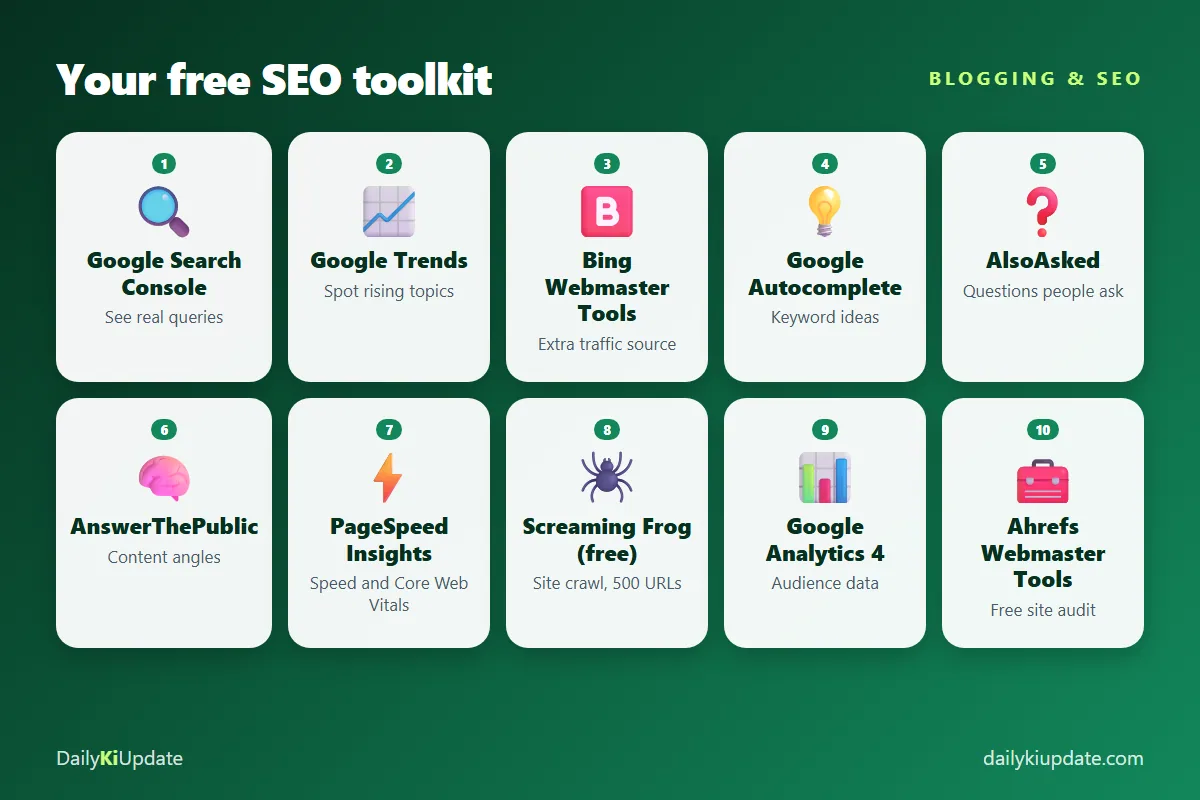
The tools below are grouped by those three jobs.
Job 1: Find keywords people actually search for
1. Google Trends
Google Trends shows how interest in a topic changes over time and across regions. It tells you whether a topic is growing, seasonal or dying, and you can compare two keywords side by side. For example, comparing "ChatGPT prompts" and "AI prompts" shows which phrase people use more.
How to use it: look at the last 12 months and 5 years. Check "Related queries" for rising terms. Switch the source to YouTube Search if you also make videos.
Limit: it shows relative popularity, not exact search volumes.
2. Google Autocomplete and "People also ask"
The simplest keyword tool is the search bar itself. Type your topic and read the suggestions: those are real searches. Then look at the "People also ask" box and the "Related searches" at the bottom of the results page. Turn those into headings and FAQ questions in your article.
3. AlsoAsked
AlsoAsked maps the "People also ask" questions into a tree, so you can see how questions connect. This is excellent for planning an FAQ section or a full topic cluster. The free plan allows a small number of searches, so use it for your most important posts.
4. AnswerThePublic
Type a keyword and get questions, comparisons and prepositions people use with it ("keyword for", "keyword vs", "how to keyword"). It is useful for brainstorming angles. The free version limits daily searches.
Job 2: Get found, crawled and indexed
5. Google Search Console (the most important free tool)
If you only set up one tool, make it this one. Search Console shows how Google sees your site, in Google's own data:
- Performance: the queries that bring people to your site, plus impressions, clicks, click-through rate and average position.
- Indexing: which pages are indexed, and why others are not.
- Sitemaps: submit your sitemap so Google discovers new posts quickly.
- URL Inspection: check a single URL and request indexing after you publish or update it.
- Experience reports: Core Web Vitals and mobile usability problems.
Performance data is only kept for about 16 months, so export it from time to time if you want long-term history.
The simplest win: open Performance, filter for queries where your average position is between 8 and 20, and improve those pages: better title, clearer answer, more depth. They are already close to page one.
6. Bing Webmaster Tools
Bing is smaller than Google, but it also powers other search experiences, and its tools are free. You can import your site straight from Search Console in a few clicks. Bing Webmaster Tools includes reports, a site scan, keyword research data and support for IndexNow, which lets you tell participating search engines about new or updated URLs instantly.
Job 3: Audit and improve your site
7. PageSpeed Insights
Paste a URL to see performance on mobile and desktop, plus Core Web Vitals (loading, interactivity and visual stability), with specific fixes. Slow pages frustrate readers and can hold rankings back. Common easy wins for blogs are compressing images (see Squoosh in our list of free websites), serving WebP, and lazy-loading images below the fold.
8. Screaming Frog SEO Spider (free version)
This desktop app crawls your site like a search engine and lists broken links, missing titles and meta descriptions, duplicate titles, redirect chains and more. The free version crawls up to 500 URLs, which is plenty for most blogs. Run it once a month.
9. Ahrefs Webmaster Tools
Verify your own site and you get a free site audit and backlink data about it, from a well-known SEO company. It is great for finding technical problems and seeing who links to you. It only works for sites you own.
10. Google Analytics 4
While Search Console tells you how people find you, Google Analytics tells you what they do after they arrive: which pages they read, where they come from and how long they stay. Use it to see which posts bring engaged readers, and write more like them. Mind your region's privacy and consent rules when you use it.
A free SEO tool stack, summarised
| Job | Tool | Use it to |
|---|---|---|
| Find keywords | Google Trends, Autocomplete, AlsoAsked, AnswerThePublic | Pick topics and headings |
| Get indexed | Google Search Console, Bing Webmaster Tools | Submit sitemaps, request indexing, see queries |
| Audit | PageSpeed Insights, Screaming Frog, Ahrefs Webmaster Tools | Fix speed, broken links, technical issues |
| Understand readers | Google Analytics 4 | See what content works |
How to choose a keyword, step by step
- Start with a topic you know. You will write better content.
- Collect 10 to 20 related phrases from Autocomplete, People also ask and AlsoAsked.
- Check Google Trends to avoid declining topics.
- Google the keyword yourself. Who ranks? Are they huge brands or small blogs? If page one is only giant sites, pick a more specific phrase (a "long-tail keyword").
- Check intent. Do searchers want a how-to, a list, a comparison or a product page? Match that format.
- Write something better. More useful, clearer, more current, with real examples.
On-page basics every blogger should do
- Title: include the main keyword near the start, and make it worth clicking. Keep it under about 60 characters so it is not cut off.
- Meta description: a short summary of 150 to 160 characters that makes people want to read.
- One H1, then logical H2 and H3 headings.
- Answer quickly. Put a clear answer near the top, then go deeper.
- Images with descriptive alt text and compressed file sizes.
- Internal links to related posts. They help readers and help Google understand your site.
- Update old posts. Refresh dates, facts and screenshots. Do not change the URL.
SEO mistakes beginners make
- Chasing only high-volume keywords. New blogs rarely win those. Go specific first.
- Writing for search engines, not people. Stuffing keywords makes content worse. Write naturally.
- Publishing thin or copied content. Google rewards original, helpful pages.
- Ignoring mobile. Most readers are on phones.
- Expecting instant results. SEO usually takes months. Be consistent.
- Changing URLs after publishing. If you must, set up a 301 redirect.
Frequently asked questions
What is the best free SEO tool for bloggers?
Google Search Console. It uses Google's own data about your site, and it is free.
Can I do keyword research for free?
Yes. Google Trends, Autocomplete, People also ask, AlsoAsked and Search Console give you everything you need to start. Paid tools add convenience and scale, not magic.
How long does it take for a new blog post to rank?
It varies. Some pages show up within days, but ranking well usually takes weeks or months, especially for new sites. Submit your sitemap and keep publishing helpful content.
How do I get Google to index my new post?
Submit your sitemap in Search Console, link to the post from other pages on your site, and use URL Inspection to request indexing. Google decides what to index, so quality matters.
Do I need to pay for SEO tools?
Not at the start. Free tools are enough to learn and grow. Consider paid tools when you manage many sites or need large-scale competitor research.
Final thoughts
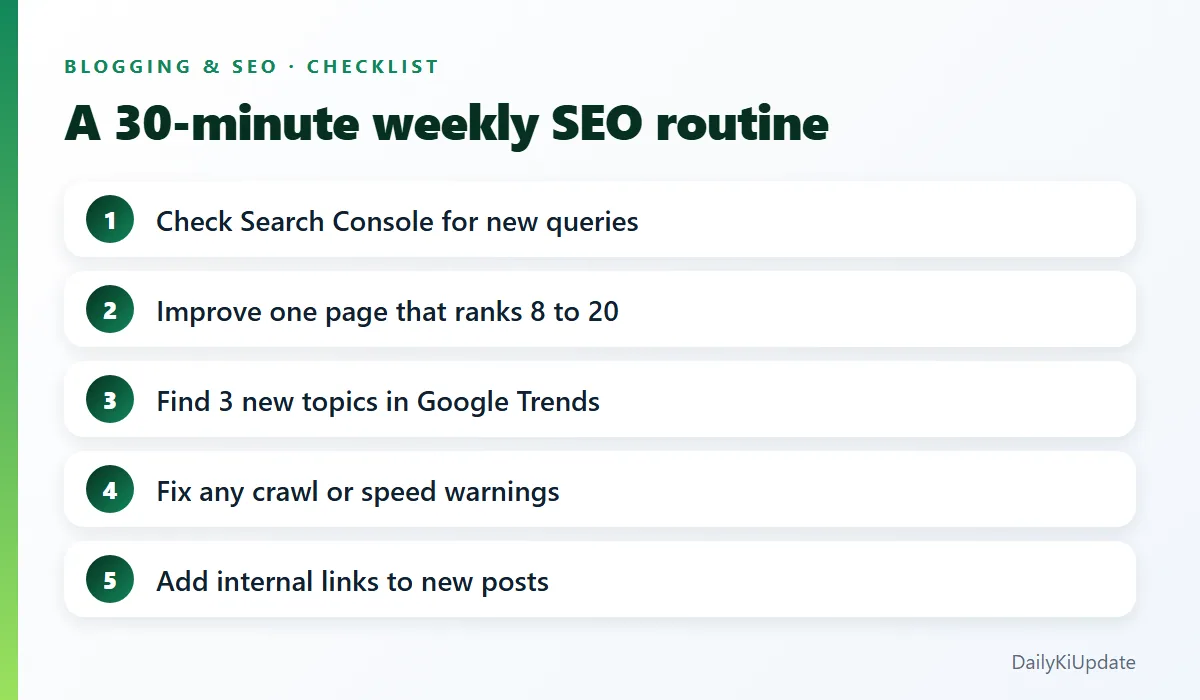
You do not need ten tools open at once. Set up Search Console and Bing Webmaster Tools today, then follow the 30-minute weekly routine in the checklist above. Over a few months, you will know what your readers want, and you will be writing content that earns its traffic.
If you are also using AI to speed up your workflow, read our guide to AI prompts with examples for blogging prompts.
Which SEO tool do you use most? Share it in the comments.