Before an interview call, many recruiters and hiring managers will look you up on LinkedIn. For a fresher with limited work experience, the profile is a chance to show what you can do, not just where you studied. It is also free. A few hours of careful work can make you much easier to find.
This guide is for students and recent graduates in India. Every example is a template, so replace the details with your own true information. Recruiters notice exaggeration quickly.
1. Profile photo and banner
Use a clear, recent photo with your face taking up most of the frame, in good light, with a plain background and neat clothes. It does not need to be a studio shot. A phone photo against a wall works. Add a simple banner, even a plain colour or a banner with your skill area, rather than leaving the default.
2. Headline: the most important line
Your headline appears next to your name in search results, comments and messages. By default, LinkedIn fills it with "Student at [college]", which tells nobody anything. Use a formula:
Target role | Key skills | Proof
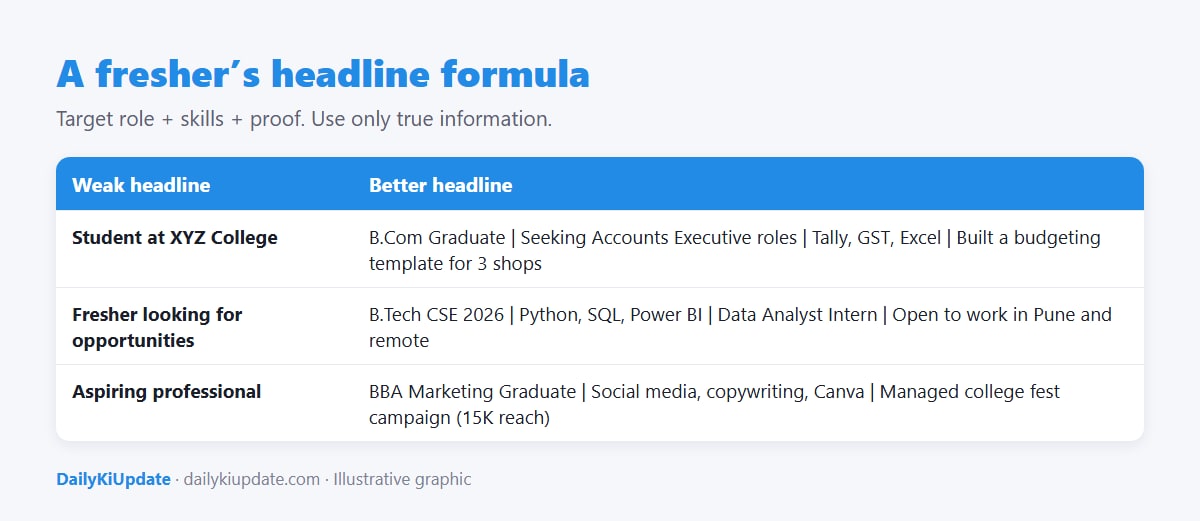
| Weak headline | Better headline |
|---|---|
| Student at XYZ College | B.Com Graduate | Seeking Accounts Executive roles | Tally, GST, Excel |
| Fresher looking for opportunities | B.Tech CSE 2026 | Python, SQL, Power BI | Data Analyst Intern |
| Aspiring professional | BBA Marketing | Social media, copywriting, Canva | Led a college fest campaign |
Use the words recruiters search for, such as the job title and tools, and avoid vague words like "passionate" or "hard-working".
3. About section: tell a short story
In 3 to 5 short paragraphs, say who you are, what you are good at, what you have done and what you are looking for. A simple structure:
- Who you are: your degree, your focus and what interests you.
- What you have done: two or three projects, internships or achievements, with numbers if possible.
- Skills and tools you work with.
- What you want next: the role type and location, and how to reach you.
I am a 2026 B.Com graduate from Pune with a focus on accounting and taxation. During a two-month internship at a chartered accountant's office, I helped prepare GST returns for 20 small clients and learned to reconcile purchase registers with GSTR-2B. For my final-year project, I built an Excel budgeting template that three local shopkeepers now use. I work with Tally Prime, Excel (VLOOKUP, pivot tables) and basic Power BI. I am looking for an Accounts Executive role in Pune or remote. You can reach me at [email].
(A sample. Use your own real details.)
4. Experience: include internships, projects and leadership
If you have no job, list internships, freelance work, college club roles, volunteering and live projects. For each, write two or three bullet points that start with an action verb and finish with a result. Compare "Helped with social media" with "Wrote 30 Instagram captions and grew the club's followers from 400 to 1,100 in three months."
5. Skills, education and certificates
- Add 10 to 20 relevant skills and pin the top three.
- List your degree, college and expected or actual year of graduation.
- Add certificates that are relevant and real, such as courses from NPTEL or SWAYAM, see our guide to free courses.
- Ask seniors and mentors for short recommendations.
6. Featured section: show your work
Use the Featured section to pin a project link, a GitHub repository, a portfolio, a report or a presentation. For developers, pair this with a strong resume, see how to write a standout developer resume.
15-point checklist
- Clear, recent profile photo
- Custom banner
- Headline with target role, skills and proof
- Custom profile URL (linkedin.com/in/yourname)
- Location set correctly
- About section with real examples
- At least two experience or project entries with results
- Education with graduation year
- 10 to 20 skills added
- Top three skills pinned
- Two relevant certificates
- One or two recommendations
- Featured section with a project link
- "Open to work" set visible only to recruiters, if you prefer discretion
- Contact email added and professional
How to grow your network without spamming
- Connect with classmates, seniors, alumni, teachers and people from your internships.
- When you send a request to someone you do not know, add a short note. For example: "Hi Anil, I am a B.Com graduate from Pune interested in accounting roles. I admired your post about GST reconciliation. I would be glad to connect."
- Comment thoughtfully on posts from people in your field. One useful comment is better than ten "Great post!" replies.
- Follow companies you want to join and read their job posts.
Safety on LinkedIn
- Do not pay anyone for a job or "training fee", and do not share OTPs or bank details with a recruiter. Read our guide on spotting fake job offers.
- Do not put your phone number or home address in public text. Use the contact info section.
- Check that the recruiter's profile and company page are genuine.
Frequently asked questions
Do I need LinkedIn Premium as a fresher?
No. The free account is enough to build a profile, connect and apply. Premium is optional.
What should I write if I have no experience?
Write about projects, internships, college roles, volunteering and skills. Show what you built or did.
Is it okay to use the "Open to work" banner?
Yes. You can choose whether recruiters only or everyone can see it.
How often should I update my profile?
When something changes: a new project, certificate or role. Check once a month.
Should I post content?
It helps but is not required. Sharing what you learn or build can make you stand out, as long as it is genuine.